
UKG Wallet
UKG, Inc.Business
4.51.86K Reviews
- Version
- 1.0.25
- Installs
- 100.00K
- Age Rating
- Everyone
Screenshots
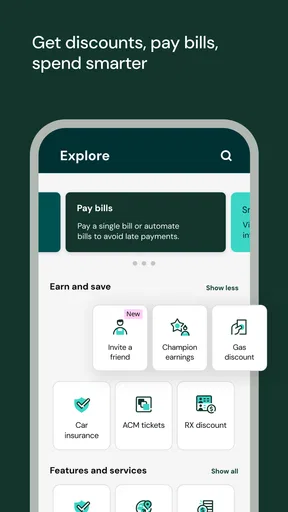
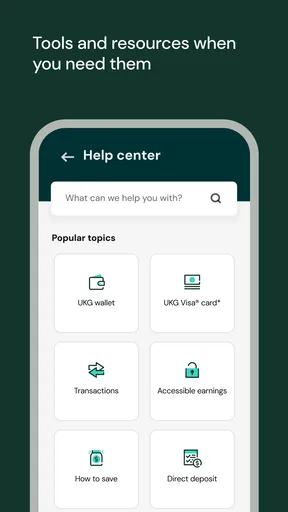
Our Review of UKG Wallet
 Analysis by Appyee
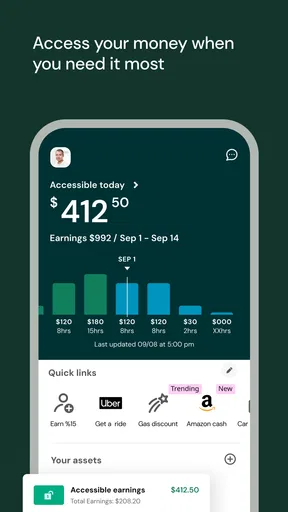
Getting access to earned wages sounds simple, but the first experience with UKG Wallet can depend heavily on how an employer has configured the service. I found that the app makes the most sense as an employer-connected business tool rather than as a standalone money app. Its purpose is to help eligible employees access wages they have already earned, so the value appears during the gap between completing work and receiving the normal paycheck.
That distinction matters. You do not open it expecting a general budgeting suite, a bank replacement, or a way to create income from nothing. You use it when your workplace supports the service and you need a clearer view of what may be available before payday. UKG, Inc. develops the app, which is free to install and rated for Everyone. It belongs in the business category, and its average rating is 4.5 from around 12 thousand ratings, giving it a solid reputation among people who can actually use its employer-linked functions.
Where the experience usually gets stuck
The biggest source of confusion is often eligibility, not the phone application itself. A person can download UKG Wallet and still find that the useful parts are unavailable until the employer relationship is recognized. This is an important difference from ordinary finance apps, where signing up usually begins with personal details and a bank connection. Here, your workplace setup is part of the product experience.
That means a login problem may have several possible causes. You might be using an email address that does not match your employment record, entering information differently from the way your employer has it recorded, or trying to use the app before your organization has completed its own setup. I would check those possibilities before repeatedly resetting a password or reinstalling the app.
Another point that can surprise new users is the difference between wages already earned and wages that are merely expected. The app is designed around earned wages, not a future estimate that you can freely treat as available cash. If a recent shift or work period is not reflected yet, that does not automatically mean the app has lost information. Payroll timing, employer processing, and the point at which work data becomes available can all affect what you see.
This is where the app’s simple store summary can create an overly quick expectation. Access to earned wages is useful, but it is not necessarily instant in every situation. I would treat the displayed amount as a workplace-linked figure that depends on current records, rather than as a live balance that updates after every action.
The app also may not be the right place to resolve every pay question. If your hours, rate, deductions, or employment status look wrong, the underlying issue may belong with payroll or human resources. UKG Wallet can be the screen where you notice the problem, without being the system that created it. That distinction saves time and prevents a frustrating cycle of deleting and reinstalling the app.
What to check before blaming the phone
Before troubleshooting deeply, I would confirm that the phone meets the app’s basic software requirement. The current version is 1.0.25 and requires Android 10 or newer. If the device is running an older system, installation or normal operation may be unreliable. On a compatible phone, I would also make sure the operating system is fully updated and that the app itself is using its current available release.
A stable connection is another sensible first check. A weak mobile signal or unreliable Wi-Fi can make sign-in pages appear frozen, leave a loading screen unfinished, or cause a completed action to look as though it failed. Switching between Wi-Fi and mobile data is a quick way to separate a connection problem from an account problem.
It is also worth checking the phone’s date and time settings. Authentication and secure account sessions can behave strangely when the device clock is significantly wrong. Keeping the time set automatically is a small preparation step, but it avoids a surprisingly unhelpful troubleshooting path.
I would then close the app completely and reopen it, rather than tapping the same button over and over. If the screen still behaves incorrectly, restarting the phone is a reasonable next step. These are ordinary checks, but they are especially useful here because a business app may be waiting for a response from an employer-connected service rather than processing everything locally.
When entering account details, slow down and check keyboard substitutions, spaces, capitalization, and saved credentials. Password managers are convenient, but they can retain an outdated password after an employer changes account details. Trying the credentials manually once can reveal whether the problem is the app or an old autofill entry.
A setup approach that prevents avoidable confusion
I recommend starting with the information your employer uses for work records. Use the same personal details and contact information associated with your employment profile, and avoid creating a second identity with a different email address simply because it is easier to remember. If the app cannot match you to the workplace record, a second attempt with inconsistent information can make the situation harder to explain.
Before expecting a wage figure to appear, confirm that your employer offers the service to your role and that your work activity has been processed. This is particularly important for a new employee, someone who recently changed departments, or anyone whose hours are approved on a schedule rather than immediately. The app’s usefulness begins after the employer-side connection is in place.
During setup, read each screen instead of rushing through it. If the app asks you to confirm identity or account details, use information you can verify from your workplace records. A mismatch is more likely to require employer assistance than another reinstall. Keeping a note of the exact error message is helpful because “it does not work” gives support very little to investigate, while a specific message and the time it appeared provide a useful starting point.
Privacy is another reason to use a careful setup routine. UKG Wallet deals with employment and wage information, so I would avoid signing in on a shared device or leaving an unlocked phone unattended. I would also avoid sending screenshots that expose more pay information than necessary when asking for help. A cropped image or a written description is safer when the full screen is not needed.
The app is free, which removes one barrier to trying it, but “free” does not mean that every employee automatically receives the same experience. The employer relationship remains central. If your workplace does not support the relevant service, installing the app will not turn it into a general-purpose wage account.
Recovering when a wage figure or action looks wrong
When something appears missing, I would first establish what kind of problem it is. Is the issue limited to a delayed update, is the amount inconsistent with approved hours, or can you not sign in at all? Those situations point to different next steps, and treating them all as an app crash wastes time.
For a delayed update, wait until the work information would normally be processed, then reopen the app and check again. I would not repeatedly submit the same request just because the first screen did not change immediately. Repeated attempts can create uncertainty about which action actually went through, especially when a network connection is unstable.
If the displayed amount conflicts with your own records, compare the dates and work periods carefully. A common mistake is comparing a current app figure with a full pay-period total, or comparing scheduled hours with hours that have actually been approved. The useful comparison is between the same work period and the same status of the hours.
For example, imagine I finish a shift late in the week and expect to see the amount available right away. If the workplace still needs to process that shift, the app may not yet reflect it. If the shift later appears but the amount still differs from my records, I would gather the date, hours, and relevant pay information before contacting payroll. That gives the employer a concrete question instead of a vague complaint about the app.
When the problem is sign-in, I would avoid creating multiple accounts. I would verify the login details, restart the session, and then contact the appropriate workplace support channel if the account still cannot be matched. If the problem is a missing or incorrect wage record, payroll or human resources is usually the more useful destination. The app can display a work-linked result, but it cannot correct an employer’s time record from the phone alone.
Reinstalling should be a later step, not the first one. It can clear local glitches, but it does not repair an incorrect employment record or activate a service your organization has not enabled. If you do reinstall, make sure you still know the correct sign-in details and use the same account information afterward.
When the app is not the cause
It is easy to blame a mobile interface when the real issue is timing. Wage information passes through workplace processes, and the app depends on the information made available to it. A delay after a shift, a change in employment status, or a recently updated payroll record can therefore look like a technical failure even when the application is functioning normally.
The same applies to eligibility. If one colleague can use the service and you cannot, that does not prove your phone is defective. Differences in employment status, workplace configuration, or account records may explain the result. I would ask a precise question of the employer: whether my role is enabled and whether my latest work information has been processed for the wallet service.
This is also where expectations should remain realistic. UKG Wallet is not a replacement for a full payroll portal when you need detailed pay-stub analysis, corrections, tax information, or a complete employment history. A traditional payroll system may be better for those tasks. The wallet app’s strength is narrower: it focuses on access to earned wages and the convenience of checking that employer-linked service from a phone.
Compared with asking payroll for an advance, the app can offer a more direct self-service route when the employer supports it. Compared with a standard banking app, however, it is much less independent because its usefulness depends on workplace records. Compared with a budgeting app, it is not primarily designed to categorize spending or build a long-term financial plan. Choosing between these tools depends on the problem you are trying to solve.
I would also avoid treating early wage access as extra income. It changes when part of your earned money becomes available, not how much you earn overall. For someone managing irregular bills, that timing may be genuinely helpful. For someone who tends to spend as soon as money appears, moving access earlier could make the normal payday budget more difficult. The app can improve flexibility, but the financial discipline still has to come from the user.
Who will get the most from it
This app is a good fit for employees whose workplace supports it and who occasionally need visibility or access before the regular payday. It can be especially practical for handling a small urgent expense after work has already been completed, rather than relying on a credit card or waiting for the normal payroll cycle.
It is also useful for people who prefer checking a phone instead of contacting payroll for every basic availability question. The convenience is not that it eliminates all payroll communication; rather, it can give you a quicker first look at the information connected to your earned wages.
I would be more cautious if your income is highly variable and your hours are frequently corrected after submission. In that situation, the amount you see may require more interpretation, and a direct conversation with payroll may be more reliable for resolving discrepancies. The same caution applies if you need detailed financial planning rather than wage access.
People who do not have an employer connection, who want a conventional bank account, or who are looking for a complete expense-management tool should choose something designed for those purposes instead. Installing this app simply because it is free will not make it a substitute for those services.
My practical verdict after using it
UKG Wallet is a focused business app with a clear purpose, and I appreciate that its best use is easy to understand once the employer connection is working. The experience becomes much less mysterious when you separate three questions: can I sign in, has my work information been processed, and is the amount accurate for the same work period I am checking?
Its main weakness is the amount of setup and workplace dependency that sits outside the phone. A polished screen cannot solve an unconfigured employee record, an unapproved shift, or a payroll correction. New users should therefore begin with eligibility and account matching, not with repeated reinstalls. That single change in approach can make the first experience considerably smoother.
The app has passed one hundred thousand installs and is rated for Everyone, while its current release remains 1.0.25. Those details suggest a widely used, actively maintained mobile product, but they do not remove the need to understand how employer-linked wage access works. I would judge it by whether it reliably fits your workplace workflow, not by treating it like an independent finance app.
For an eligible employee who wants a convenient way to access earned wages, I think it is worth trying. Keep your expectations tied to processed work records, protect your employment information, and contact payroll when the underlying hours or pay details are wrong. The most useful habit is to treat the app as a window into an employer-connected process, not as the process itself.
Verdict
Strengths of UKG Wallet
- Centralizes pay, tax, and employment details in one mobile app.
- Quick access to payslips helps users check earnings away from a desktop.
- Useful notifications can remind employees about payroll and HR updates.
- Supports secure sign-in options offered by participating employers.
- Clean interface makes routine payroll tasks relatively easy to find.
Limitations of UKG Wallet
- Features vary significantly depending on the employer’s UKG setup.
- Some payroll updates may appear only after the employer processes them.
- Requires an active UKG-supported workplace account to be useful.
- Login or verification issues can prevent access when credentials fail.
- The app offers limited value for former employees or inactive accounts.
Other Releases by UKG, Inc.
View All


Similar Picks in This Category
View All
LinkedIn: Community & Network
LinkedIn3.8

Zoom Workplace
zoom.com4.1

Microsoft Teams
Microsoft Corporation4.6

Meta Business Suite
Meta Platforms, Inc.4.6

Webex Meetings
Cisco Systems, Inc.4.5

TeamViewer Remote Control
TeamViewer4.4
Frequently Asked Questions
What is UKG Wallet and what does it do?
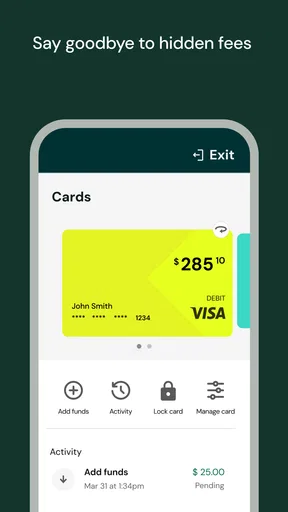
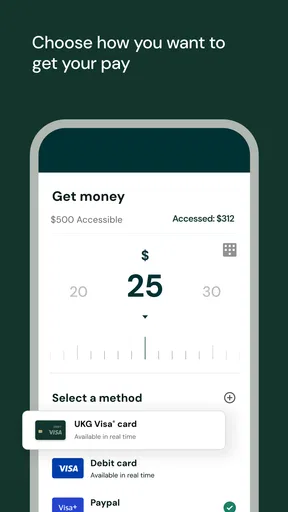
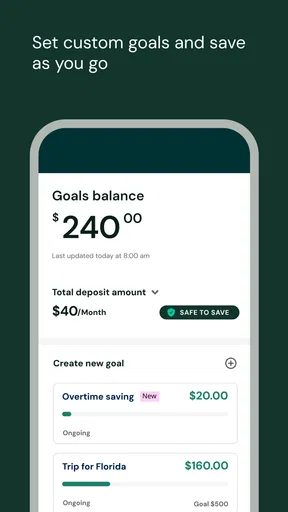
UKG Wallet is a financial wellness and earned wage access app connected to participating UKG employer systems. Depending on your employer’s setup, it may let you view available earned wages before payday, transfer eligible funds, review payment activity, and access related financial tools. Features can differ by company, payroll schedule, location, and employment status, so the app may not offer the same options to every user.
Who can use UKG Wallet, and how do I sign up?
UKG Wallet is generally available only to employees whose organization has enabled the service through UKG. You typically need to verify your identity using information connected to your employer’s payroll account, then create login credentials and follow the security prompts. If your employer is not supported, your details do not match payroll records, or enrollment is unavailable, you may need to contact your HR or payroll department rather than registering independently.
Can I access my wages before the normal payday?
If your employer supports earned wage access, UKG Wallet may show a portion of wages you have already earned before the regular payday. The amount available can change as work hours are recorded and payroll data is updated. Transfers may also be subject to eligibility rules, processing times, limits, and possible fees. It is important to check the confirmation screen carefully before requesting money, because early access can affect your final paycheck.
Are there fees for using UKG Wallet?
Some UKG Wallet services may be free, while certain transfer methods or optional features can involve a fee. The exact cost depends on your employer’s configuration, the type of transaction, and the delivery option you select. Before confirming a transfer, review the displayed fee, estimated arrival time, and amount you will receive. If the terms are unclear, consult the in-app help section or ask your employer’s payroll team.
Is UKG Wallet safe, and what should I do if I have a problem?
UKG Wallet uses account authentication and security controls intended to protect personal and payroll-related information, but users should still use a strong, unique password, keep the app updated, and avoid sharing verification codes. If you notice an incorrect balance, failed transfer, login issue, or suspicious activity, contact UKG Wallet support through the official app or website. Payroll and employment-data questions may need to be handled by your employer’s HR department.
